Daraja Agent Kit
Tracing an STK Push
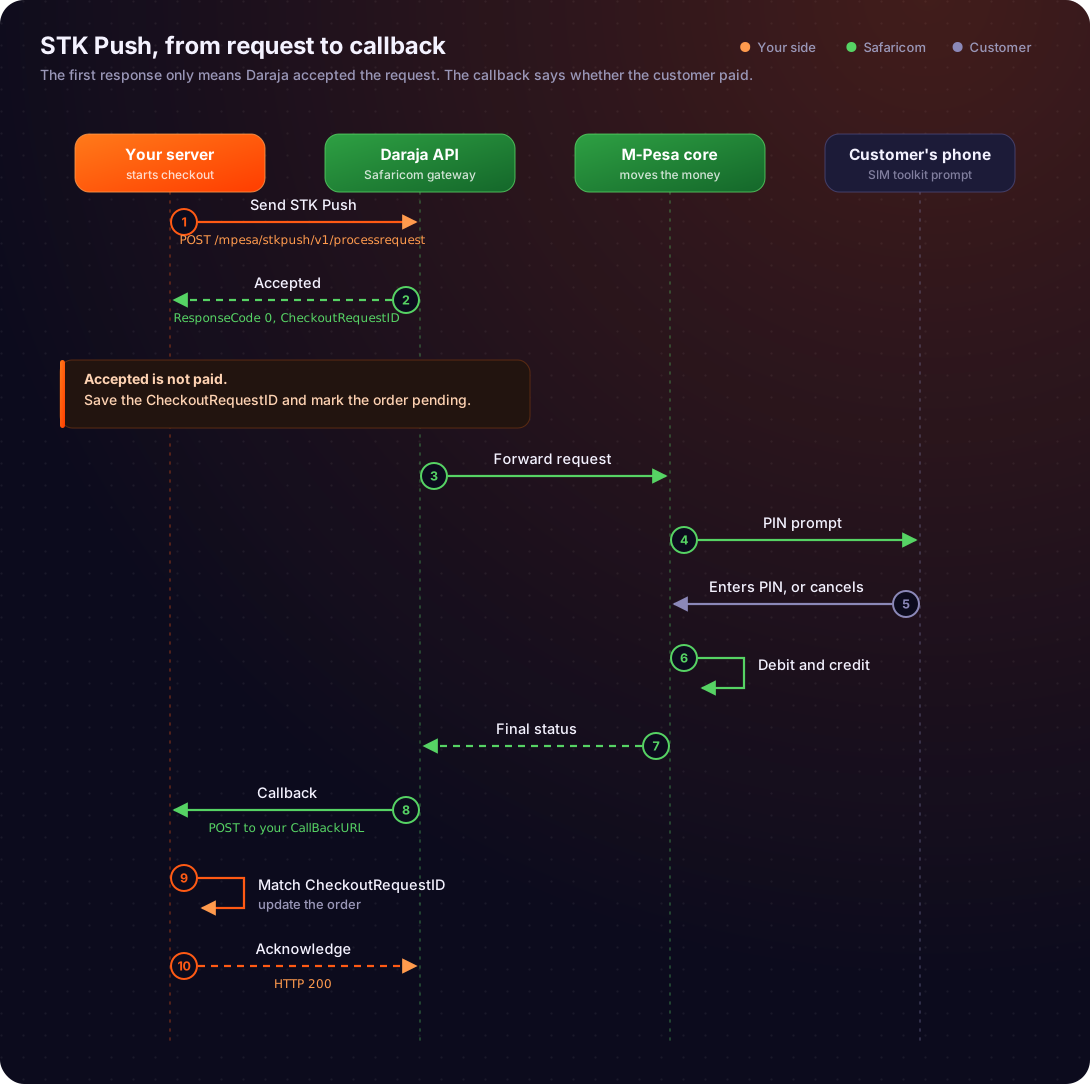
One STK Push call followed from request to callback.
Step-by-Step Trace: STK Push API Call Example
To illustrate the synchronous and asynchronous phases concretely, let's trace an STK Push (Sim Tool Kit Push) transaction, a common Mpesa integration scenario where a business initiates a payment request to a customer's phone.
Scenario: A customer wants to pay for goods on an e-commerce website using Mpesa. The website initiates an STK Push to the customer's phone.
Developer Server (E-commerce Website Backend) Action:
- The customer clicks "Pay with Mpesa" on the website.
- The e-commerce backend prepares an STK Push request. This involves:
- Generating a unique
OriginatorConversationIDfor its internal tracking. - Specifying the
Amount,PhoneNumber,AccountReference,TransactionDesc. - Crucially, it includes a
CallBackURLwhere Daraja should send the final transaction status. - It obtains an access token from Daraja's OAuth endpoint.
- It encrypts the
PasskeyandTimestampto generate thePasswordfor the request.
- Generating a unique
- The server sends an HTTP POST request to the Daraja STK Push endpoint (
/mpesa/stkpush/v1/processrequest).
Daraja API (Synchronous Phase):
- Daraja receives the STK Push request.
- It performs immediate validations: authentication token, request payload structure, basic parameter validity.
- If valid, Daraja returns an HTTP 200 OK response to the e-commerce server.
- This synchronous response contains:
MerchantRequestID: A unique ID generated by Daraja for this specific merchant request.CheckoutRequestID: A unique ID generated by Daraja for this specific STK Push transaction, which is critical for correlating the asynchronous callback.ResponseCode: Typically "0" for success, indicating the request was accepted.ResponseDescription: A human-readable description (e.g., "Success. Request accepted for processing").CustomerMessage: A message displayed to the customer on their phone (e.g., "Success. Please enter your M-PESA PIN to complete the transaction.").
- At this point, the e-commerce server knows that the STK Push prompt has been sent to the customer's phone. It does not know if the customer has entered their PIN or if the transaction will succeed.
Mpesa Backend Processing:
- Daraja forwards the request to the Mpesa core system.
- The Mpesa system sends an STK Push prompt to the customer's mobile phone.
- The customer receives the prompt, reviews the transaction details, and enters their Mpesa PIN.
- The Mpesa system processes the payment: debits the customer's account, credits the business's till number, and updates transaction records.
- The Mpesa system determines the final status (e.g., successful, insufficient funds, user cancelled, timeout).
Daraja API (Asynchronous Phase - Callback):
- Once the Mpesa transaction is complete, Daraja's system constructs a callback payload with the final transaction details.
- This payload includes:
MerchantRequestIDandCheckoutRequestID(to correlate with the initial request).ResultCode: "0" for success, or other codes for various failures (e.g., 1032 for cancelled, 1031 for insufficient funds).ResultDesc: A detailed description of the outcome.MpesaReceiptNumber: The unique Mpesa transaction ID if successful.TransactionDate,Amount,PhoneNumber, etc.
- Daraja sends an HTTP POST request to the
CallBackURLprovided by the e-commerce server in the initial STK Push request.
Developer Server (E-commerce Website Backend) Action:
- The e-commerce server's designated callback endpoint receives the POST request from Daraja.
- It parses the JSON payload.
- It uses the
CheckoutRequestIDto find the corresponding pending transaction in its own database. - Based on the
ResultCodeandResultDesc, it updates the transaction status in its database (e.g., "Payment Successful", "Payment Failed - Insufficient Funds"). - It might then trigger further actions, such as updating the order status, sending a confirmation email to the customer, or displaying a success/failure message on the website.
- Crucially, the e-commerce server responds to Daraja with an HTTP 200 OK to acknowledge receipt of the callback.
This entire flow ensures that the e-commerce website gets immediate feedback that the payment process has started, and definitive feedback once the payment is actually completed or failed, without having to continuously poll Daraja for status updates.
Visualizing the Request-Response Cycle
The following Mermaid sequence diagram illustrates the complete flow for an STK Push transaction, highlighting the distinct synchronous and asynchronous interactions.