 Daraja Agent Kit
Deep dive
How the sandbox behaves and where it differs from production.
5. Deep-Dive Analysis Blocks
To provide a comprehensive understanding, let's explore some critical aspects in more detail.
5.1. Case Study: A Typical E-commerce Sandbox Setup
Consider an e-commerce platform named "ShopSmart" that needs to integrate Mpesa payments for its online store. ShopSmart wants to allow customers to pay using STK Push (for a smooth checkout experience) and also via C2B (for customers who prefer to initiate payments manually). Additionally, ShopSmart needs to process refunds to customers and pay its suppliers.
Scenario Requirements:
- Accept payments from customers using STK Push.
- Accept payments from customers via C2B (Paybill).
- Process refunds to customers.
- Pay suppliers (other businesses).
- Check the status of any transaction.
- Monitor its Mpesa account balance.
Walkthrough of API Selections and Why:
- Mpesa Express (STK Push):Selected. This is essential for initiating payment requests directly to customers' phones for online checkout.
- C2B (Customer to Business):Selected. This is needed to receive payments from customers who manually pay to ShopSmart's Paybill number.
- B2C (Business to Customer):Selected. This is required for processing refunds to individual customers.
- B2B (Business to Business):Selected. This is necessary for ShopSmart to pay its suppliers.
- Transaction Status:Selected. This is crucial for verifying payment success, handling delayed confirmations, and providing customer support.
- Account Balance:Selected. This is important for monitoring the business's Mpesa liquidity and for reconciliation purposes.
- Reversal:Selected. While B2C can handle refunds, Reversal is specifically for undoing a previous transaction, which might be needed if a customer overpays or an order is canceled immediately after payment.
- Register URL:Selected. This is vital for C2B payments. ShopSmart needs to register a Confirmation URL to receive real-time notifications when a customer pays its Paybill number. A Validation URL might also be registered if ShopSmart wants to validate incoming payments before they are completed (e.g., checking if an account number is valid).
💡 What is happening here: For an e-commerce business like ShopSmart, a wide range of Mpesa APIs are needed to handle various payment scenarios, from customer payments to refunds and supplier payouts. Each API serves a specific function to meet the business's operational needs.
Credentials Needed for Each Operation:
Global Authentication (OAuth 2.0):
- Consumer Key: Identifies ShopSmart's application.
- Consumer Secret: Authenticates ShopSmart's application to obtain an Access Token.
- Access Token: Obtained using the Consumer Key and Secret, included in the
Authorizationheader for all API calls.
Mpesa Express (STK Push):
- Passkey: Used to generate the
Passwordparameter in the STK Push request payload. - Sandbox Shortcode: The Paybill number (e.g.,
174379) to which payments are directed.
- Passkey: Used to generate the
C2B (Customer to Business):
- Sandbox Shortcode: The Paybill number (e.g.,
600999) customers will pay to. - Confirmation URL: The endpoint on ShopSmart's server where Mpesa will send payment confirmations.
- Validation URL (Optional): The endpoint on ShopSmart's server where Mpesa will send validation requests before completing a C2B transaction.
- Sandbox Shortcode: The Paybill number (e.g.,
B2C (Business to Customer), B2B (Business to Business), Account Balance, Transaction Status, Reversal:
- Initiator Username: The authorized username (e.g.,
testapi). - Security Credential: The encrypted password for the Initiator Username, generated using Safaricom's public sandbox certificate.
- Sandbox Shortcode: The business's own shortcode from which funds are disbursed or whose balance is queried.
- Initiator Username: The authorized username (e.g.,
💡 What is happening here: Different Mpesa operations require specific credentials. A Consumer Key and Secret are used for general access, while Passkeys, Shortcodes, Initiator Usernames, and Security Credentials are needed for particular transaction types like STK Push or B2C payments.
How These Credentials Would Be Used in a Hypothetical Application:
ShopSmart's backend application (e.g., a Python Flask or Node.js Express server) would:
- Store Credentials Securely: The Consumer Key, Consumer Secret, Passkey, Initiator Username, and the encrypted Security Credential would be stored as environment variables or in a secure secret management system (e.g., AWS Secrets Manager, HashiCorp Vault). The sandbox public certificate would also be stored securely for encryption purposes.
- Obtain Access Token: Before making any Mpesa API call, the application would first send a POST request to the Daraja OAuth endpoint (
https://sandbox.safaricom.co.ke/oauth/v1/generate?grant_type=client_credentials). This request would use the Consumer Key and Consumer Secret (Base64 encoded asConsumerKey:ConsumerSecretin theAuthorization: Basicheader). The response from this request would contain theaccess_token. - Make API Calls:
- STK Push: When a customer checks out, the application constructs an STK Push request payload. This payload includes the customer's phone number, the amount, the business shortcode, and a dynamically generated
Password(created from the Passkey, shortcode, and a timestamp). It then sends this to the STK Push endpoint with the Access Token in theAuthorization: Bearerheader. - C2B Confirmation: When a customer pays via C2B, Mpesa sends a POST request to ShopSmart's configured Confirmation URL. The application then processes this callback to update the order status.
- B2C Refund: To issue a refund, the application constructs a B2C request payload. This includes the customer's phone number, the amount, the business shortcode, the Initiator Username, and the encrypted Security Credential. It sends this to the B2C endpoint with the Access Token.
- Transaction Status Check: To check a transaction, the application constructs a request with the transaction ID, business shortcode, Initiator Username, and Security Credential. It then sends this to the Transaction Status endpoint with the Access Token.
- STK Push: When a customer checks out, the application constructs an STK Push request payload. This payload includes the customer's phone number, the amount, the business shortcode, and a dynamically generated
This case study illustrates how the selection of APIs directly translates into the specific credentials required and the operational flow within a real-world application.
💡 What is happening here: A real application uses its securely stored credentials to first get an Access Token, which acts like a temporary pass. Then, it uses this token along with other specific credentials to make various Mpesa API calls, such as initiating payments or processing refunds.
5.2. Under the Hood: OAuth 2.0 and Daraja Authentication
The Mpesa Daraja API uses OAuth 2.0 for authentication and authorization. Specifically, it employs the Client Credentials Grant flow. This flow is ideal for server-to-server communication where an application needs to access its own resources, or resources it has been authorized to access, without direct involvement from an end-user.
What is OAuth 2.0? OAuth 2.0 is an authorization framework that allows an application to gain limited access to a user's (or, in this case, a business's) resources on an HTTP service. It does this without requiring the application to know or store the user's actual credentials. This is achieved through the issuance of Access Tokens.
💡 What is happening here: OAuth 2.0 is a standard way for applications to get permission to access resources without needing the user's password. It works by giving out temporary "Access Tokens."
The Client Credentials Grant Flow (Daraja Implementation):
Application Registration: As we've seen, the developer registers an application with the Daraja portal. During this process, the Daraja Authorization Server (Safaricom's authentication system) issues a unique Client ID (which is your Consumer Key) and a Client Secret (which is your Consumer Secret) to the application.
Request for Access Token: When your application needs to make an API call, it first sends a request to the Daraja Authorization Server's token endpoint. This request includes:
grant_type=client_credentials: This parameter explicitly states that the application is using the Client Credentials Grant flow.Authorizationheader: This header contains theClient IDandClient Secret, which are encoded using Base64. The format isBasic <base64_encoded(ConsumerKey:ConsumerSecret)>.
Example HTTP Request to obtain token:
httpPOST /oauth/v1/generate?grant_type=client_credentials HTTP/1.1 Host: sandbox.safaricom.co.ke Authorization: Basic Y29uc3VtZXJrZXk6Y29uc3VtZXJzZWNyZXQ= Content-Type: application/json(Where
Y29uc3VtZXJrZXk6Y25zdW1lcnNlY3JldA==is the Base64 encoding ofconsumerkey:consumersecret)Authorization Server Validation: The Daraja Authorization Server receives this request. It then validates the provided
Client IDandClient Secret. If they are valid and match a registered application, the server proceeds to issue an Access Token.Issuance of Access Token: The Authorization Server responds with a JSON (JavaScript Object Notation) object. This object contains the
access_tokenand itsexpires_invalue, which indicates its lifetime in seconds.Example HTTP Response (Token):
JSON{ "access_token": "YOUR_GENERATED_ACCESS_TOKEN_STRING", "expires_in": "3599" }The
access_tokenis typically a long, opaque string (often a JWT - JSON Web Token, though its internal structure is not usually relevant to the client).Using the Access Token for API Calls: Your application then includes this
access_tokenin theAuthorizationheader of all subsequent requests to the Mpesa API endpoints. The format isAuthorization: Bearer <access_token>.Example HTTP Request to an Mpesa API endpoint:
httpPOST /mpesa/stkpush/v1/processrequest HTTP/1.1 Host: sandbox.safaricom.co.ke Authorization: Bearer YOUR_GENERATED_ACCESS_TOKEN_STRING Content-Type: application/json { "BusinessShortCode": "174379", "Password": "...", "Timestamp": "...", "TransactionType": "CustomerPayBillOnline", "Amount": "1", "PartyA": "254708374149", "PartyB": "174379", "PhoneNumber": "254708374149", "CallBackURL": "https://mydomain.com/path", "AccountReference": "CompanyXLTD", "TransactionDesc": "Payment of X" }
💡 What is happening here: Your application first uses its Consumer Key and Secret to ask the Daraja Authorization Server for a temporary Access Token. Once it receives this token, it includes it in all future requests to Mpesa APIs to prove it's authorized.
Token Expiry and Refresh:
Daraja Access Tokens are typically short-lived, often lasting for about 1 hour (or 3600 seconds). This is a security best practice: if a token is compromised, its usefulness is limited by its short lifespan. Daraja does not typically implement a "refresh token" mechanism for the Client Credentials Grant. Instead, when an Access Token expires, the application simply requests a new one using its Consumer Key and Consumer Secret. Applications should implement logic to check token expiry and automatically request a new token when needed or upon receiving an "unauthorized" error (e.g., HTTP 401) due to an expired token.
Sequence diagram: getting a token, then calling the API
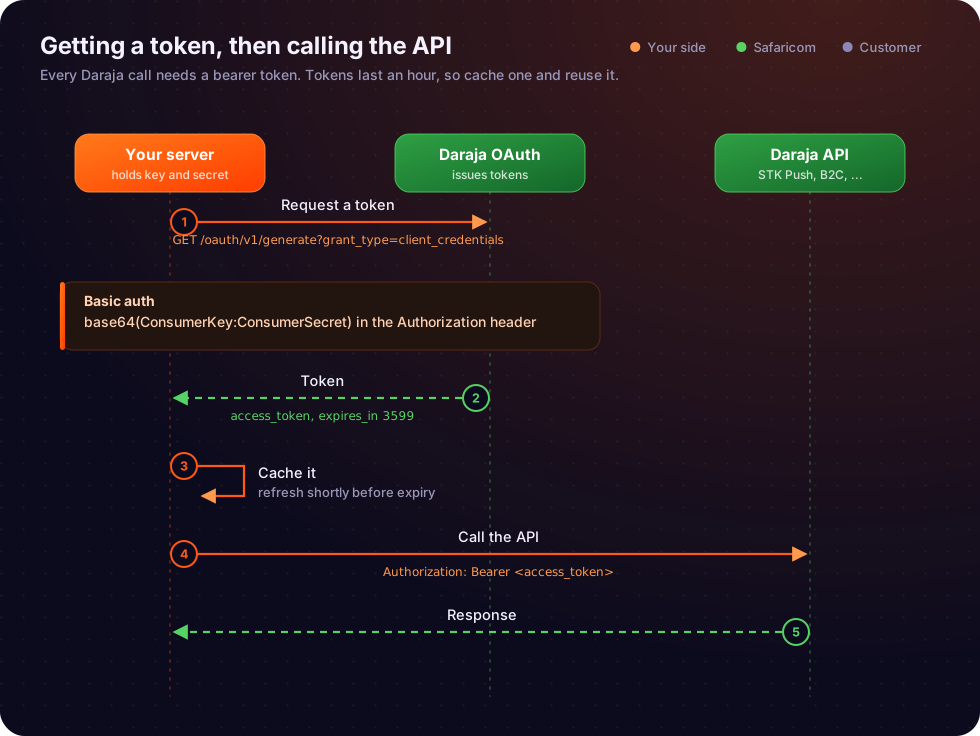
This sequence diagram visually represents the flow: your application first authenticates with the Daraja Authorization Server to get a token, and then uses that token to authorize requests to the actual Mpesa API endpoints.
5.3. Failure Modes, Pitfalls & Misconceptions
Understanding common pitfalls is as important as understanding the correct procedure. These are frequent issues developers encounter:
Incorrect API Selection:
- What happens: If you don't select an API (e.g., Mpesa Express) during app creation, your application will receive an authorization error (e.g., HTTP 403 Forbidden) when it tries to call that specific API. This happens even if you have a valid Access Token. The Access Token only grants access to the application, but the application itself must have permissions for the specific API.
- Remedy: Go back to the Daraja portal, edit your application, and enable the required API.
Mismanaging Consumer Secret:
- What happens: Hardcoding the Consumer Secret directly into your source code, committing it to a public version control repository (like GitHub), or exposing it in client-side JavaScript. This makes your application vulnerable. An attacker could use your Consumer Key and Secret to generate Access Tokens and potentially perform unauthorized transactions.
- Remedy: Always store secrets in environment variables, dedicated secret management services (e.g., AWS Secrets Manager, Azure Key Vault, HashiCorp Vault), or secure configuration files that are not committed to version control. Never expose them on the client-side.
Incorrect Passkey Usage (for STK Push):
- What happens: The Passkey itself is not sent in the STK Push request. A common error is sending the raw Passkey or incorrectly generating the
Passwordparameter. ThePasswordparameter is a Base64 encoded string ofBusinessShortCode + Passkey + Timestamp. If this is incorrect, the STK Push request will fail with an authentication error. - Remedy: Double-check the exact concatenation and Base64 encoding logic. Ensure the
Timestampformat isYYYYMMDDHHmmss(e.g.,20261019153000) and matches the timestamp used in the request.
- What happens: The Passkey itself is not sent in the STK Push request. A common error is sending the raw Passkey or incorrectly generating the
Sandbox vs. Production Credential Confusion:
- What happens: Using sandbox Consumer Key/Secret with production API endpoints, or vice-versa. This will always result in authentication failures. Sandbox credentials only work with sandbox endpoints (
sandbox.safaricom.co.ke), and production credentials only work with production endpoints (api.safaricom.co.ke). - Remedy: Maintain strict separation between sandbox and production configurations. Use environment variables to switch between endpoint URLs and credentials based on the deployment environment.
- What happens: Using sandbox Consumer Key/Secret with production API endpoints, or vice-versa. This will always result in authentication failures. Sandbox credentials only work with sandbox endpoints (
Callback URL Misconfiguration:
- What happens: For C2B confirmations or STK Push callbacks, if the
CallBackURLis incorrect, inaccessible, not HTTPS, or not publicly resolvable, your application will not receive transaction notifications. This leads to a disconnect between Mpesa's transaction status and your application's state. - Remedy: Ensure callback URLs are publicly accessible, use HTTPS, are correctly spelled, and your server is configured to receive POST requests at that endpoint. During development, tools like
ngrokcan expose local development servers to the internet for testing callbacks.
- What happens: For C2B confirmations or STK Push callbacks, if the
Security Credential Generation Errors (for B2C/B2B/Reversal):
- What happens: Errors in encrypting the Initiator password, such as using the wrong public certificate (e.g., production certificate for sandbox), incorrect encryption algorithm (e.g., RSA/ECB/PKCS1Padding instead of RSA/ECB/OAEPWithSHA-256AndMGF1Padding or similar), or incorrect Base64 encoding. This will lead to authentication failures for these sensitive APIs.
- Remedy: Always use the correct environment's public certificate (sandbox certificate for sandbox, production for production). Verify the encryption algorithm and padding scheme specified in Daraja documentation. Use reliable cryptographic libraries.
Expired Access Tokens:
- What happens: If an API call is made with an expired Access Token, the Daraja API will return an HTTP 401 Unauthorized error.
- Remedy: Implement token caching and refresh logic. Store the Access Token and its expiry time. Before making an API call, check if the token is expired or about to expire. If so, request a new token.
💡 What is happening here: Common mistakes include not enabling the right APIs, exposing secret keys, incorrectly generating passwords for STK Push, mixing up sandbox and production credentials, and misconfiguring callback URLs or security credentials. These errors lead to authentication failures and prevent your application from working correctly.
5.4. Security Implications of Sandbox App Creation
Even though the sandbox environment does not involve real money, the credentials generated for it still hold significant value and must be protected.
- Why even sandbox credentials need to be protected:
- Intellectual Property: Your sandbox application configuration, API selections, and even the mere existence of your integration plans can be sensitive information.
- Abuse Potential: While not directly financial, compromised sandbox credentials could be used to flood the sandbox environment with requests. This could potentially impact other developers' testing or even lead to rate limiting for your account.
- Precursor to Production: Poor security practices in the sandbox often translate to poor security practices in production. Establishing good habits early is crucial. If developers get used to hardcoding sandbox secrets, they might inadvertently do the same for production secrets.
- Phishing/Social Engineering: Compromised sandbox credentials could be used as part of a larger social engineering attack to gain access to more sensitive systems or information.
💡 What is happening here: Even though sandbox credentials don't involve real money, they still need strong protection. This is because they can reveal sensitive information, be abused to disrupt testing, lead to bad security habits for production, or be used in larger cyberattacks.
Best practices for storing API keys:
- Environment Variables: This is the most common and recommended method for development and deployment. Secrets are loaded from the environment at runtime and are not part of the codebase itself.
- Secret Management Services: For production environments and larger teams, services like AWS Secrets Manager, Azure Key Vault, Google Secret Manager, or HashiCorp Vault provide centralized, secure storage, access control, and rotation capabilities for secrets.
- Configuration Files (Securely Managed): If using configuration files, ensure they are located outside the web root, have restricted file permissions, and are explicitly excluded from version control (e.g., via a
.gitignorefile). - Never Hardcode: Avoid embedding API keys directly into your source code.
- Never Commit to Version Control: Ensure
.gitignorerules prevent secret files or environment variable files from being committed to Git or other VCS (Version Control Systems).
The role of IP whitelisting:
- What it is:IP whitelisting is a security measure where the API provider (Safaricom) is configured to only accept API requests originating from a predefined list of approved IP addresses.
- In Daraja: While less common for sandbox environments, IP whitelisting is a critical security feature for production Daraja applications, especially for sensitive APIs like B2C, B2B, and Reversal. It adds an extra layer of defense: even if your credentials are stolen, an attacker cannot use them unless they originate from a whitelisted IP address.
- Sandbox Context: For the sandbox, IP whitelisting is usually not enforced, allowing developers to test from various development environments. However, it's important to be aware of its existence and plan for its implementation in production.
💡 What is happening here: To keep API keys safe, they should never be hardcoded or committed to public repositories. Instead, use environment variables or dedicated secret management services. Additionally, IP whitelisting is a powerful security feature in production that restricts API access to only approved network locations.